

What is Broken Link Checker?
Broken Link Checker (by AIOSEO) is a WordPress plugin that continuously monitors your site for broken links, missing images, and redirect chains, then reports them in a centralized dashboard for quick resolution. The original Broken Link Checker plugin by ManageWP was deprecated, and AIOSEO released its own rebuilt version that uses cloud-based checking rather than server-side crawling — an important architectural shift that prevents the resource-heavy server load that made the original notorious for slowing down WordPress sites.
The AIOSEO version operates via their external scanning infrastructure, reducing the impact on your hosting server. It monitors both internal and external links, detects 404 errors and broken image references, and allows you to fix or unlink broken URLs directly from the plugin’s dashboard without navigating to individual posts. A free tier allows scanning up to 250 links. Paid plans start at $15/month, scaling with the number of links monitored.
For large content sites where broken links accumulate over time — particularly from external sources that move or delete pages — Broken Link Checker provides a low-maintenance way to maintain link health without manual audits. It integrates with AIOSEO for a combined SEO and link health view. Sites with thousands of posts and years of content benefit most; newer sites with limited content may not need dedicated tooling beyond periodic manual checks or a one-time Screaming Frog crawl.
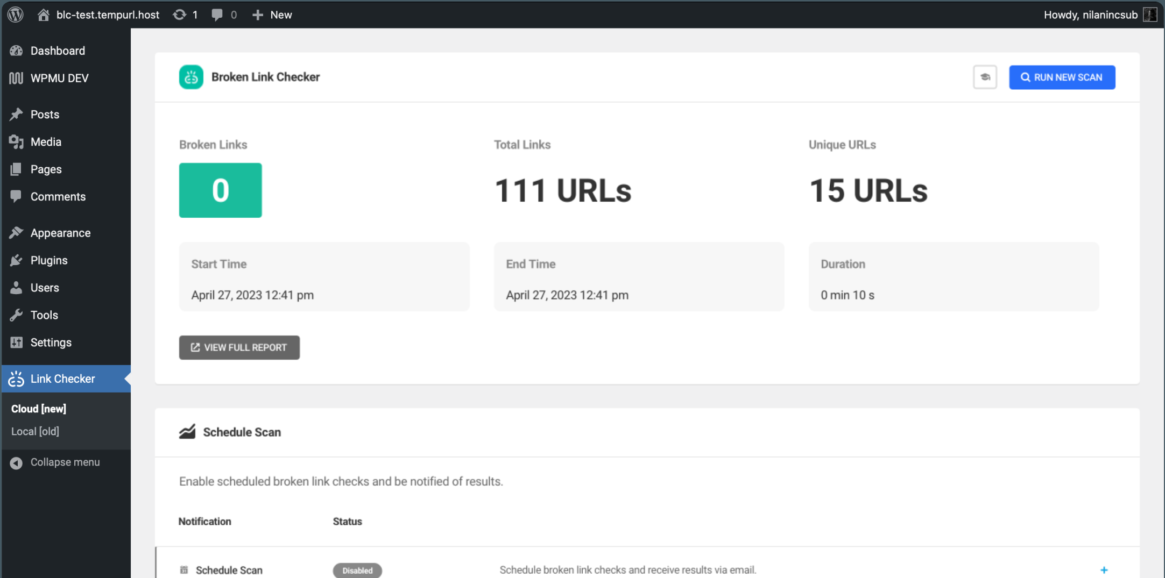
Broken Link Checker Key Features
- Cloud-based link scanning (no server resource drain)
- Monitors internal and external links across all posts and pages
- Detects 404 errors, broken images, and redirect chains
- Fix or unlink broken URLs directly from the dashboard without editing posts
- Email notifications for new broken links
Broken Link Checker Pros & Cons
Pros
- Cloud-based architecture avoids the server performance issues of the original BLC plugin
- Fix broken links without navigating to individual posts
- Continuous monitoring catches newly broken external links automatically
Cons
- Free tier limited to 250 links — insufficient for most established sites
- Paid plans at $15/month add up for a single-purpose tool
Broken Link Checker Free vs Premium
Free: scan up to 250 links, basic broken link detection. Premium: starts at $15/month — more link quota, priority scanning, advanced reporting. Pricing scales with site size.
Common Broken Link Checker Problems & Fixes
Broken Link Checker is showing hundreds of false positives for links that work fine — why?
False positives occur when the scanning server is blocked by the target site. Many websites block automated crawlers, returning 403 or 503 responses to the scanner even though the link is fine for human visitors. Check flagged links manually in a browser — if they load correctly, they are false positives. In the BLC dashboard, you can mark these links as “not broken” to remove them from reports. For external links to sites known to block crawlers (LinkedIn, some news sites), expect recurring false positives.
The Broken Link Checker dashboard shows no results after setup — how do I trigger a scan?
After installation, AIOSEO’s Broken Link Checker needs to run its initial cloud scan, which can take time depending on site size and plan. Go to the Broken Link Checker dashboard and look for a Scan button or status indicator. If no scan has started, verify your AIOSEO account is connected (the plugin requires an account even on the free tier). Ensure your site is publicly accessible — scanning behind maintenance mode or basic auth will prevent the cloud scanner from crawling.
I fixed a broken link in the post editor but Broken Link Checker still shows it as broken — why?
After fixing a link, BLC needs to rescan that URL to update its status. Click the Recheck button next to the specific link in the BLC dashboard rather than waiting for the next scheduled scan. If the link still shows as broken after a recheck, the destination URL may still be returning an error — test it directly in your browser to confirm the fix actually worked.
Broken Link Checker Customization
How do I exclude specific links or domains from Broken Link Checker scanning?
In the Broken Link Checker settings, there is an exclusion list where you can add specific URLs or domain patterns to skip during scanning. This is useful for domains that consistently block crawlers (returning false positives), internal admin URLs, or affiliate links that use redirect services. Wildcard patterns (e.g., linkedin.com/*) can exclude all links from a specific domain.
Can Broken Link Checker scan links inside custom post types or page builder content?
AIOSEO’s Broken Link Checker scans all publicly accessible links it can find via its cloud crawler — this includes most standard content areas. Page builder content stored in the post_content field (Elementor, Beaver Builder) is typically scanned. Content in custom database tables or dynamically generated links (not in post content) may not be detected. For comprehensive coverage of complex page builder layouts, supplement with a desktop crawler like Screaming Frog.
Frequently Asked Questions about Broken Link Checker
Is the original Broken Link Checker plugin (by ManageWP) still usable?
The original Broken Link Checker by ManageWP is still available on WordPress.org but has not received active development. Its server-side scanning approach is known to cause significant server load on large sites. The AIOSEO version is the actively maintained successor with a better architecture. For most sites, migrating to the AIOSEO version or using a cloud-based SEO auditing tool is preferable.
How does Broken Link Checker compare to Screaming Frog for finding broken links?
Broken Link Checker runs continuously inside WordPress, catching newly broken links as they occur. Screaming Frog is a one-time desktop crawl tool that provides a comprehensive snapshot at a point in time. For ongoing monitoring, BLC is more practical. For a thorough audit before a site launch or after a major migration, Screaming Frog provides more detailed reports including server response codes, redirect chains, and page metadata — all in one free crawl up to 500 URLs.
Can Broken Link Checker break after updates?
Yes, that can happen, especially on older sites with many plugins. This usually happens when the plugin, theme, and add-ons are updated out of sequence. In most cases, testing on staging catches the issue before it reaches the live site. From experience, backups and changelog reviews save a lot of cleanup time.
What should I check before installing Broken Link Checker?
Start by checking whether another plugin already does the same job. In most cases, overlap is what creates avoidable conflicts and performance issues. A common issue is installing a plugin because it looks convenient without checking the stack first. From experience, a short compatibility review avoids most of the pain later.